Andrew Orr
Mon Mar 30 2026, 09:53 AM EDT · 2 minute read
macOS Terminal
Malicious ads are pushing fake Homebrew installers to Mac users, and the attack relies on trusting the first Google search result.
Attackers are buying Google ads to place a fake Homebrew site above the real one, then trick users into running a malicious Terminal command. The tactic is effective because it leans on routine behavior instead of technical exploits.
Developers and everyday Mac users rely on Homebrew to install software, which makes it a high-value target. The real installation process already involves pasting a command into Terminal, so the fake version doesn't immediately stand out.
Users expect to copy and paste setup commands, and that expectation lowers their guard at exactly the wrong moment. Attackers take advantage of that trust by presenting a nearly identical workflow with a hidden payload.
Fake Homebrew ads are doing the heavy lifting
Attackers start the flow with a sponsored Google result that appears before the official Homebrew site. A fake page mirrors the real one, but swaps the legitimate install command for an obfuscated script that runs malware.
According to a Reddit post, the command is encoded in Base64, which hides its intent behind harmless-looking text. Once pasted into Terminal, the payload decodes and installs an information stealer.
This technique isn't new, but it works because it fits into normal setup behavior. Users expect to copy and paste commands, and the encoding masks obvious red flags.
Researchers have tied the payload to AMOS, or Atomic macOS Stealer, which targets browser data, credentials, and crypto wallets. Similar tools have spread widely through fake installers and cloned sites.
Attackers now use platforms like search ads and hosted content to distribute these payloads at scale. The shift moves away from exploits and toward user-driven compromise, where people end up running the code themselves.
Why this attack works so well
Trust becomes the weak point when people search for familiar tools and expect the top result to be legitimate. An official-looking page paired with familiar setup steps lowers suspicion at exactly the wrong moment.
Sponsored results blur the line between ads and real links. Paid placements can sit above organic results, and attackers can rotate domains quickly, which makes enforcement inconsistent.
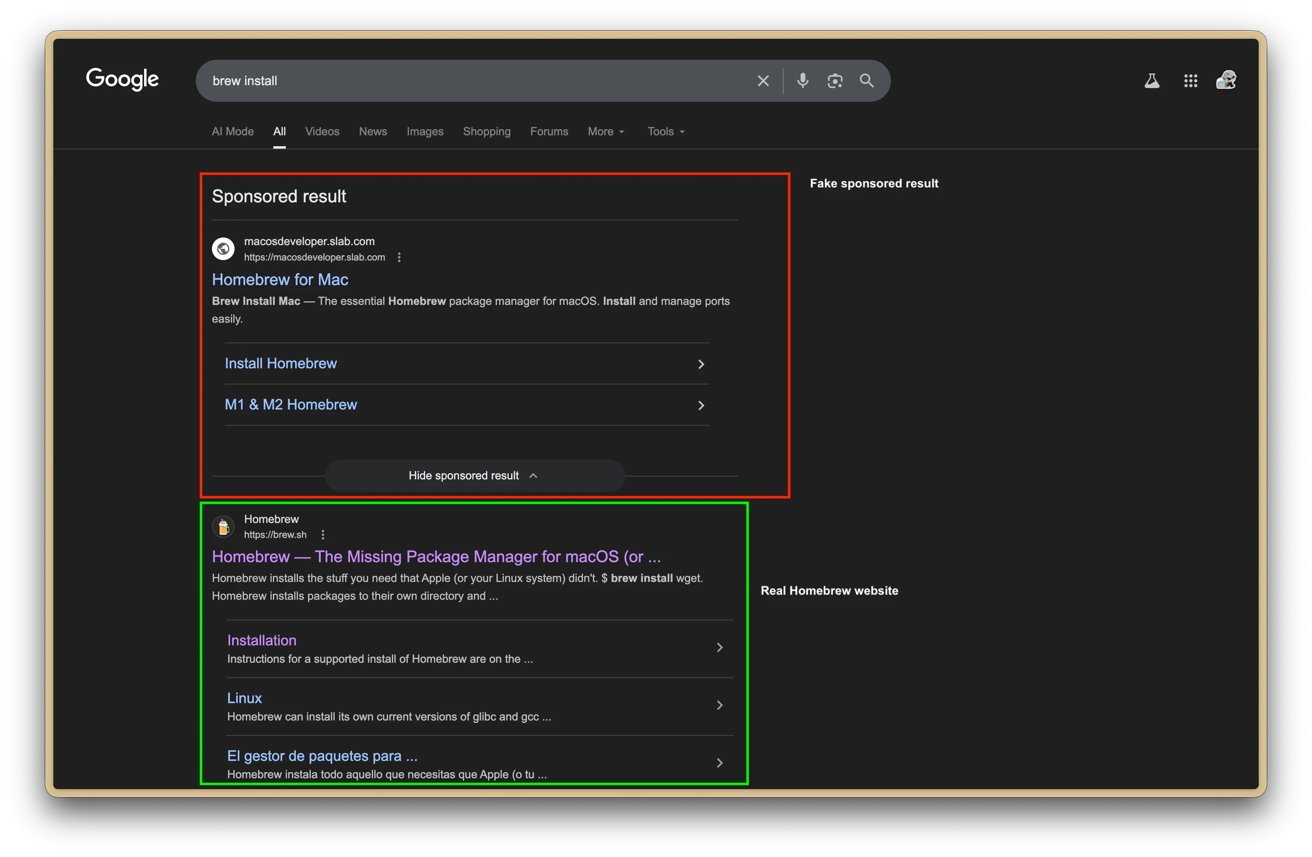
Spotting the fake website. Image credit: u/Maxdme124
Base64 encoding adds another layer of deception without being malicious on its own. In this context, it hides intent and makes dangerous commands harder to recognize before execution.
How to avoid fake Homebrew installers
Going straight to brew.sh avoids the risk of landing on a spoofed site through search results. Typing the URL directly or saving a bookmark removes the chance of clicking a malicious ad that looks legitimate.
Treat any request to paste a command into Terminal with skepticism, especially when it's obfuscated or comes from an unfamiliar site. Real installation commands are readable, so encoded scripts, odd redirects, or rushed instructions should raise immediate concern.
Use an ad blocker to strip out sponsored results entirely, which cuts off one of the main delivery paths for attacks like this. Fewer ads means fewer chances for attackers to insert themselves ahead of legitimate results.
Assume compromise if a suspicious command has already been run, then act quickly to limit damage. Change passwords, enable two-factor authentication, and check for persistence mechanisms commonly used by macOS malware to survive reboots.
