William Gallagher
2
Wed Jan 28 2026, 08:30 AM EST · 3 minute read
Malware illustration -- image credit: AppleInsider
Certain sponsored ads on Google have been trying to lead users on to faked Apple support pages that try to get the user to use the Terminal and install malware on Macs.
Where most malware attacks require a user to download and launch an app, researchers at MacKeeper have demonstrated how a number of sponsored Google ads are providing another route for bad agents.
Specifically, during the company's research, searching for the term "mac cleaner" led to some sponsored ads that appeared to be at legitimate addresses such as business.google.com. A user following those links, though, can be taken to a site that has been designed to mimic Apple's support pages.
From there, they are is instructed to open Terminal on their Mac, and enter a specific command. That command makes Terminal display text such as "Cleaning macOS Storage," but it is really executing further malware commands.
It's not clear what those commands are, since part of what the user copies and pastes is deliberately scrambling the final instructions. But the method allows the bad agent to embed any commands they want.
The fact that the commands are scrambled means anti-malware apps can't recognize them. But the key part of this is that while the user doesn't realize it, they are choosing to enter these commands.
It's like electing to open the door to malware, as just a few commands can then give hackers access to the Mac. This is similar to the way hackers send Messages that instruct to bypass Apple's iOSsecurity by choosing to restart that messaging app.
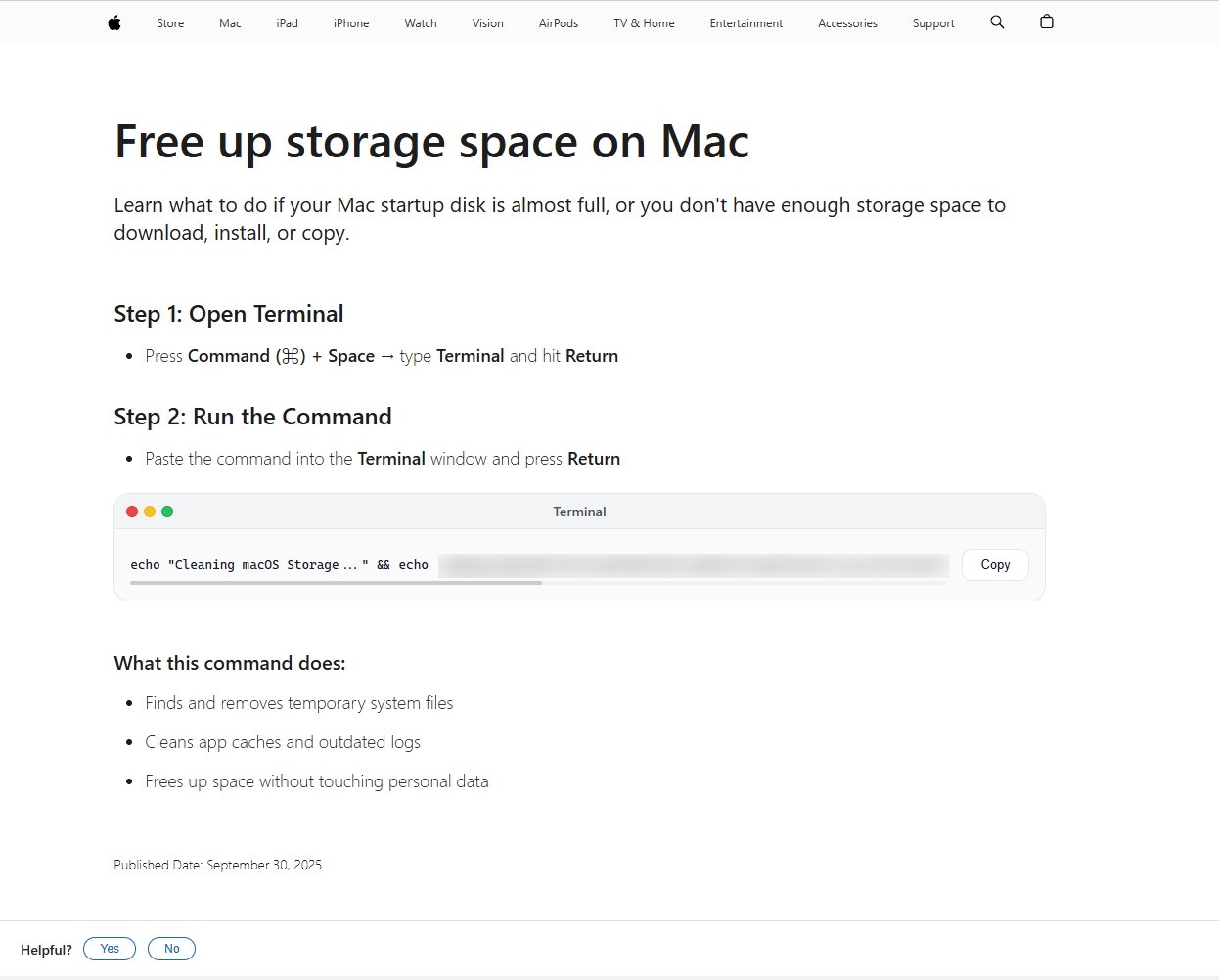
Give these bad actors credit, they mimic Apple Support pages very well — image credit: MacKeeper
At least some of the original Google ads that lead to these fake pages appear to associated with genuine advertisers. The supposition is that they have been hacked, although there is as yet no confirmation of this.
MacKeeper researchers name several such advertisers and say that they have notified Google. In AppleInsider testing, searching on "mac cleaner" appears to no longer surface such ads.
How to protect yourself
The issue here is that the attack comes first via a sponsored Google ad, so ordinarily a user could assume that was a legitimate company. Then it leads to pages that very well mimic Apple's official ones.
This all makes it the more likely that a user will be fooled, and it's also that much more difficult to determine an ad is fake. But there are certain steps you can take.
First, never believe anything that tells you to enter Terminal commands without checking for at least a second source saying the same thing. We here at AppleInsider have occasionally detailed genuine Terminal commands that are helpful, but in general, leave Terminal to those who know how to use it.
Next, always check where a link is going, or what the address of the site you're now seeing is. For the latter, when you've gone to the site, check your browser's search/address bar.
For the former, when you're presented with a link, hover over it. On Safari on the Mac, the address that link goes to is then displayed at the bottom left of the browser.
In this particular case, that might not help with the original ad since it is directing you to a legitimate site such as business.google.com. But in the final stage, when presented with an apparent Apple support page, these reported attacks all end on sites beginning script.google.com.
Once again, that is actually a legitimate site — but it isn't Apple's. A real Apple support page will only ever be on a site whose address begins support.apple.com.
Do your research
All of this requires you to vigilant about the address of sites you are going to. And, as in this case, so many of those sites can appear to be legitimate.
One other step you can take, though, is to not look for something specific such as "mac cleaner," but instead "mac cleaner reviews." Look for articles about what you want to know, and see what specific app or product names they cover.
It's all about arming yourself with more information so that you can spot when something appears to be a little off.
Although if you found this article because you searched for "mac cleaner," let us save you searching further. You probably want CleanMyMac. It's available on the Mac App Store.
